

Getting Started
Searcher access is permissionless: there is no application review or allowlist by default. You authenticate with a keypair, subscribe to the stream, and start bidding.
Prerequisites
- An Ed25519 keypair (a standard Solana keypair works) to identify your searcher.
- A gRPC client stack in your language of choice.
- SOL for tips on the network you target (testnet first; see endpoints).
Authentication flow
Flowra uses challenge-response authentication with JWT tokens. Your private key never leaves your machine.
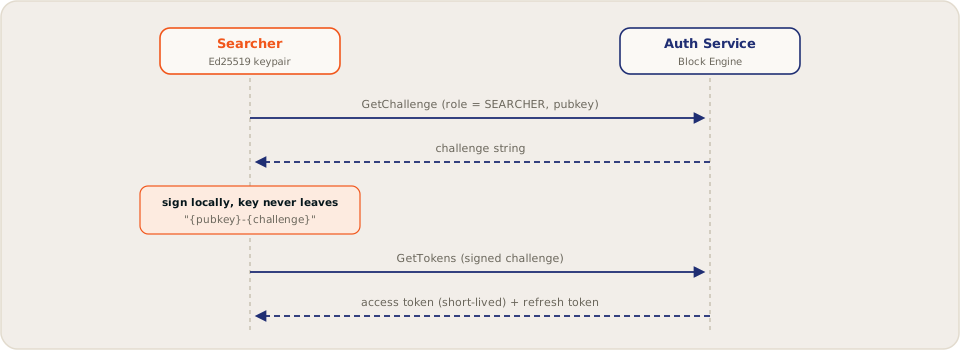
Call AuthService.GenerateAuthChallenge with your role and pubkey:
GenerateAuthChallengeRequest {
  role: SEARCHER
  pubkey: <32-byte pubkey>
}
Sign the exact string "{pubkey}-{challenge}" with your Ed25519 private key, where {pubkey} is your base58 identity and {challenge} is the returned token.
Call GenerateAuthTokens with the challenge, your pubkey, and the 64-byte signature. You receive an access token (short TTL, attach as gRPC bearer metadata on every call) and a refresh token (longer TTL). Renew access tokens with RefreshAccessToken instead of re-signing.
Proto files
The gRPC surface is defined in Flowra's mev-protos
Public repo TBD
, compatible with the widely used Jito proto layout:
The protos compile cleanly with standard tonic, grpc-js, and grpcio toolchains.
First session
With an access token in hand, a minimal loop looks like:
GetTipAccountsto learn where tips go.SubscribePendingTransactionsto open the orderflow stream (details).GetNextScheduledLeaderto see when a Flowra validator is next on rotation.- Build a bundle around an opportunity and
SendBundle(details). - Watch
SubscribeBundleResultsfor the outcome, and calibrate your next bid.
If you have integrated bundle pipelines before
The concepts map directly: bundles, tips, atomic execution, auth via challenge-response, results streaming. Differences worth noting:
- The orderflow stream is part of the product. You subscribe to pending transactions rather than relying on your own flow sources.
- Tips are auction bids settled every 50 ms, with a 5% protocol fee.
- Access is open by default: a validator can restrict its auction via policy, but the network-level default is permissionless.